

The AI tutor you think with
Point at the part
you don't get
HeyPapin is an interactive AI whiteboard tutor that explains out loud while it draws. Point at any box to ask about it, move it, or draw your own arrow, and it keeps teaching from what you changed. Other AI gives you a new answer. Papin changes the one on the board.
How it works
From a topic to a drawn, spoken lesson
HeyPapin turns any topic into a clear, step-by-step visual explanation — one object at a time.
Real Whiteboard Sessions
See what you can learn on the canvas
From technical system architecture and live Python code to multi-branch strategic frameworks — every session is an interactive, shared whiteboard.
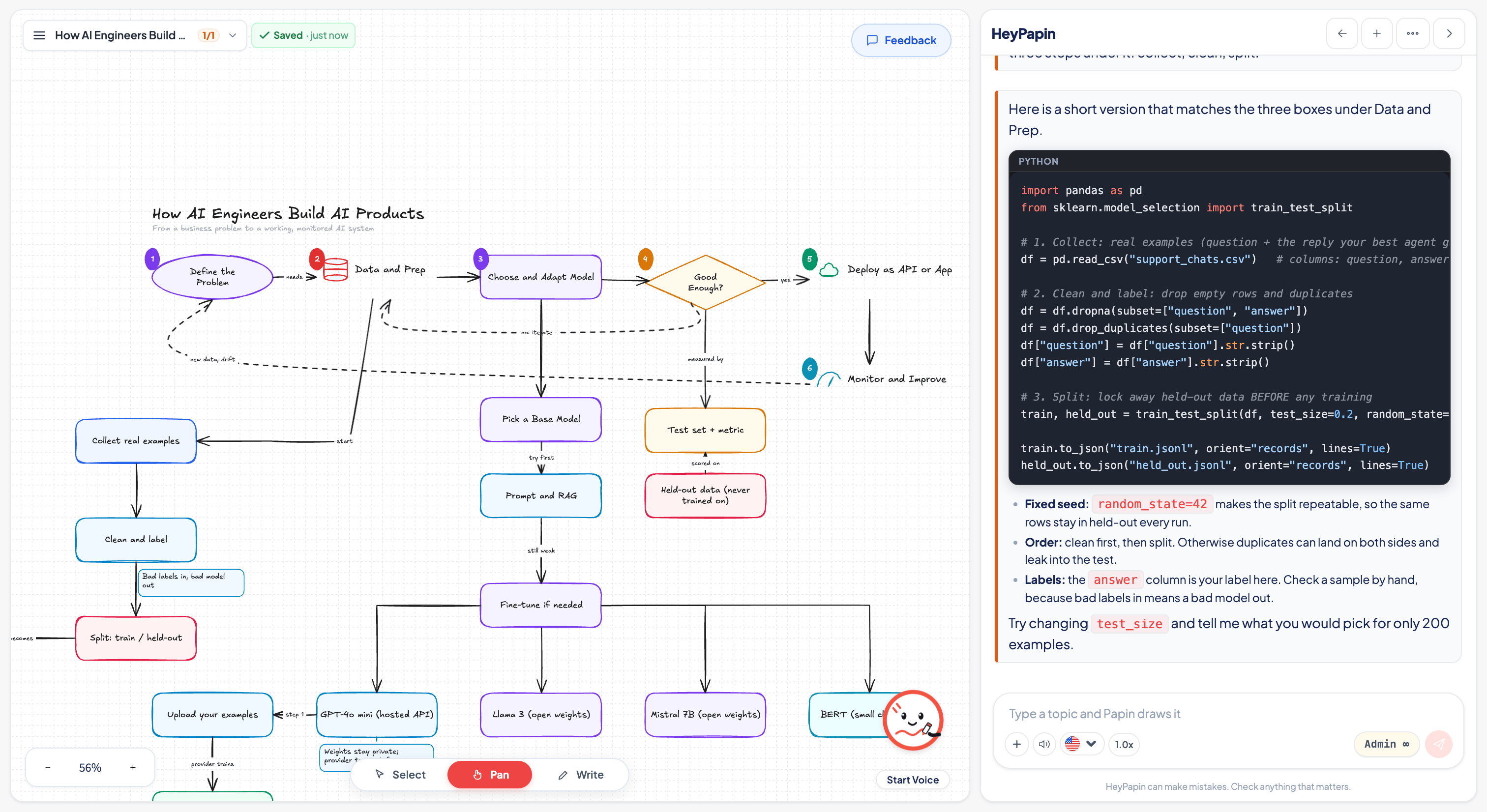
How AI Engineers Build AI Products
From business problem to deployed API. Papin breaks down the 6-stage machine learning lifecycle on the whiteboard while showing real Python code in the side rail.
- ✓Visual 6-stage lifecycle: problem framing, data prep, model selection, tuning, error analysis, and monitoring.
- ✓Live Python code: train_test_split with reproducible random_state=42 and stratified partitioning.
- ✓Model branching: compare fine-tuning paths across Llama 3, Mistral 7B, and GPT-4o mini.
Early learner feedback
A different way to understand
People told us what stood out when they tried a tutor that draws, listens, and lets them interrupt.
Why HeyPapin
How HeyPapin compares to other AI
General AI tools and chatbots are great at answers and summaries. Some can show a chart, and others can turn notes into a video. But a chat answer is another wall of text, and pre-rendered videos can't be edited. HeyPapin gives you a live, shared whiteboard where you and the tutor think together.
| What happens on the board | Standard AI Chatbots | Pre-rendered Video AI | HeyPapin |
|---|---|---|---|
| Draws while it explains | No | Partly | Yes |
| You can cut in mid-drawing | No | No | Yes |
| Answers on the object you asked about | No | No | Yes |
| You draw too, and the tutor reads it | No | No | Yes |
| Drag a box and its arrows follow | Partly | No | Yes |
Compared with standard chat-based LLMs and pre-rendered AI tools.
HeyPapin draws live, on a board you share. Stop it mid-stroke, point at the box you're stuck on, drag it somewhere else, draw your own arrow — Papin reads what you changed and keeps teaching from there.
Frequently asked questions
Everything you need to know about HeyPapin, collaborative drawing, voice interruption, and how learning happens.
“No boring walls of text. Just a marker & a real whiteboard!”
Still have questions? Ask us directly or start an interactive session to see it in action.
Built with