
Best AI Whiteboard Tutors for Visual Learners in 2026: Ranked and Compared
Searching for an AI whiteboard tutor? Most visual learners get stuck with text chatbots dumping essays or passive slide generators. We tested the top live AI whiteboard tutors in 2026—including HeyPapin, Studdy AI, Professo AI, ChalkLearn, and Flint K12—to evaluate real-time voice, canvas co-creation, and barge-in interruptions.
If you ask ChatGPT or Claude to explain how a Kalman filter works, how a transistor amplifier biases, or why the chain rule works in multivariable calculus, you already know what happens next.
You get a wall of eight dense paragraphs, interspersed with raw LaTeX equations. If you ask for a diagram, it either pastes a static ASCII block, generates a blurry image with hallucinated labels, or dumps a finished flowchart that you can only stare at.
For visual thinkers, this is an excruciating way to learn.
When a human tutor teaches you, they never recite a textbook chapter while you listen passively. They grab a dry-erase marker, draw two boxes, sketch a vector, and say: "What happens to this voltage when the switch closes right here?" Then they hand you the marker. You draw an arrow in the wrong direction; they point at it and ask why; you correct it; and the concept clicks.
Over the past year, a new class of AI whiteboard tutors has emerged to bring this dynamic into machine learning. But not all "AI whiteboards" are built the same. Some are just automated slide decks with synthesized voices; others are diagnostic recording tools for teachers; and a small few are true, real-time conversational co-creation canvases.
We tested and ranked the 7 best AI whiteboard tutors in 2026 to help you find the right tool for how your brain actually works.
The Comparison at a Glance
Here is how the top AI whiteboard tutors and visual learning platforms compare across the metrics that actually matter:
| AI Whiteboard Tutor | Interface Type | Real-Time Voice | Live Canvas Drawing | Student Can Draw (Co-Creation) | Instant Barge-In (Interrupt Mid-Explanation) | Best For | Pricing |
|---|---|---|---|---|---|---|---|
| HeyPapin | Socratic Voice + Vector Whiteboard | Yes (Ultra-low latency) | Yes (Vector lines, text, shapes) | Yes — true shared canvas | Yes — interrupts mid-stroke | STEM students & visual learners who learn by doing | Free tier / Simple pay-as-you-go |
| Studdy AI | Voice + Narrated Visuals | Yes | Yes (Generated illustrations) | No (Read-only for student) | Yes | Homework scanning & animated visual explanations | Subscription (~$15–$20/mo) |
| Professo AI | Voice Avatar + Structured Whiteboard | Yes | Yes (Pre-structured slides & board) | Limited | Moderate | K-12 school curriculum & guided lessons | Institutional / School pricing |
| ChalkLearn | Voice + Step-by-Step Chalkboard | Yes | Yes (Chalkboard style derivation) | No | Limited | Watching step-by-step calculus derivations | Freemium / Subscription |
| Flint K12 | Teacher-Governed AI Workspace | Optional | Embedded visual assets | Yes (In student editor) | n/a | K-12 classrooms with teacher guardrails | School contracts |
| Synthesis Tutor | Visual Manipulatives + Voice | Yes | Yes (Interactive game canvas) | Yes (Tactile problem solving) | Built into pacing | Elementary & middle school math intuition | Subscription (~$29/mo) |
| Snorkl | Student-Draws First + AI Feedback | Asynchronous | Yes (Student recording) | Yes — student creates the board | n/a (Async review) | Teachers assessing student reasoning | Free for teachers / School tiers |
The Spectator Trap: Why Most "AI Whiteboards" Don't Actually Teach
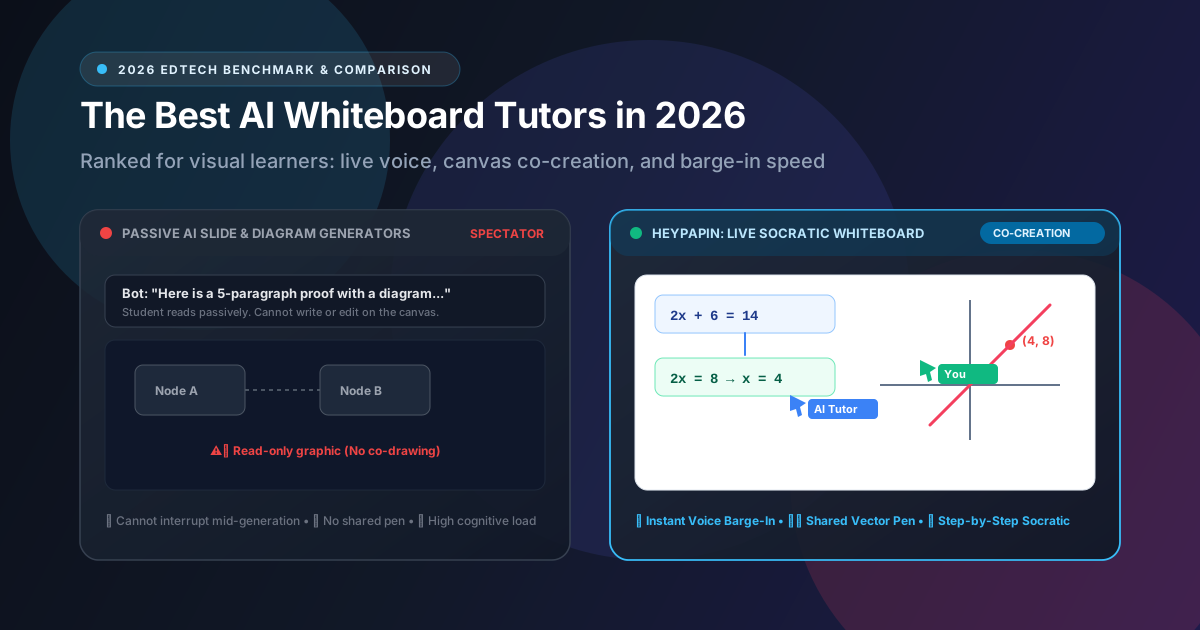
Before diving into individual reviews, there is a fundamental architectural distinction you need to understand: Spectator Mode vs. Co-Creation Mode.
Most software marketing itself as an "AI whiteboard" is actually an automated presentation generator. You type a prompt, and the AI produces a polished, complete diagram or slide deck while a synthetic voice reads a script.
Cognitive science has known for decades that watching an expert draw a finished diagram creates the Illusion of Competence. Your eyes follow the smooth curves, your brain nods along, and you feel like you understand it. But twenty minutes later, when handed a blank sheet of paper, you cannot reproduce step 2.
Passive Learning (Spectator Mode):
[AI generates finished diagram] ──> [Student watches passively] ──> ❌ 80% forgotten by tomorrow

Active Learning (Co-Creation Mode):
[AI draws Step 1] ──> [AI asks Socratic question] ──> [Student draws Step 2] ──> ✅ Deep neural retention
True visual comprehension requires co-creation:
- The tutor must draw one step at a time synchronized with spoken words.
- The canvas must be malleable: the student can take the pen, circle an equation, or sketch a counter-example.
- The tutor must be able to see what the student drew, adapt immediately, and continue the calculation from the student's stroke.
- You must be able to interrupt verbally (barge-in) the exact microsecond you get confused, without the AI crashing or restarting from slide one.
With that rubric in mind, let's examine the top 7 tools.
1. HeyPapin: Best for Live Visual Co-Creation and Socratic STEM Learning
HeyPapin was engineered specifically around one core pedagogical philosophy: the board is not a finished picture; it is a shared workspace.
Instead of spitting out canned images or paragraphs of text, HeyPapin pairs an expressive, low-latency AI voice with a live, vector-based Excalidraw canvas. When you ask a question—whether it’s deriving an eigenvalue, analyzing an electrical circuit, or understanding backpropagation in a neural network—Papin explains the concept conversationally while physically laying out equations, coordinate systems, and diagrams line by line.
How the Whiteboard Works
HeyPapin’s AI tutor doesn't dump bitmap screenshots onto your screen. It emits structured vector elements (clean geometric nodes, labeled arrows, handwritten math notation, and sketches).
Crucially, pen ownership is completely bilateral. You can grab the digital marker, write an intermediate step on the board, draw an arrow pointing to a term, or cross something out. Papin’s vision system detects your additions in real time, understands your handwriting, and responds directly: "I see why you grouped those terms on line two, but look at the minus sign in front of the parenthesis."
Key Features
- True Voice Barge-In: You don't have to wait for the tutor to finish a 40-second monologue. If you say "Wait, where did that 4 come from?" while it is drawing, the tutor stops mid-stroke, addresses your doubt, and adjusts the canvas in-place.
- In-Place Canvas Editing: Unlike crude AI whiteboard prototypes that erase the entire canvas to fix a typo, HeyPapin targets individual vector IDs (
sketch-N,teks-N) to update specific lines cleanly. - Strict Socratic Pedagogy: Papin is tuned to avoid giving away free homework answers. It guides you to the insight through visual scaffolding.
- Zero Friction: No cumbersome app installations; runs directly in modern desktop and tablet browsers with full pen/stylus support.
Limitations
- Built primarily for STEM (Mathematics, Physics, Computer Science, Engineering, Economics); less specialized for humanities essay writing.
- Designed as an intimate 1-on-1 tutoring companion rather than a mass-classroom grading manager.
Best For
High school, undergraduate, and graduate STEM students, as well as self-taught software engineers who need to understand complex, multi-variable ideas visually and conversationally.
2. Studdy AI: Best for Illustrated Voice Lectures & Homework Scanning
Studdy AI has gained significant popularity as a fast, accessible AI study buddy. You can snap a photo of a textbook problem or type in a topic, and Studdy responds with spoken audio accompanied by dynamically generated visual cards and illustrations.
How the Whiteboard Works
Studdy excels at providing aesthetically pleasing, colorful illustrations that match the subject matter. If you are studying cellular respiration, Studdy brings up clean, multi-colored anatomical and biochemical diagrams while explaining the citric acid cycle.
However, it is important to note what Studdy’s canvas is and isn’t: it is an illustration display, not an interactive whiteboard you can draw on. You cannot grab a pen, sketch your own chemical bond, or ask Studdy to correct your hand-drawn free-body diagram. The interaction model is voice-in, narrated visual-out.
Key Features
- Mobile-First Homework Scanner: Fantastic mobile app UX for scanning printed problem sets.
- Polished Graphic Presentations: High visual production quality on generated cards.
- Multi-Subject Breadth: Covers everything from middle-school biology to introductory college finance.
Limitations
- Read-Only Canvas: The student remains a spectator. No shared digital pen or co-sketching.
- Can occasionally lean towards giving the answer rather than forcing the student to think through the steps.
Best For
Students who want quick homework checks with clear, narrated visual illustrations on their phone.
3. Professo AI: Best for School-Wide K-12 Classrooms & Structured Paths
Professo AI positions itself squarely at institutional K-12 education, offering an AI-powered voice tutor equipped with an interactive digital whiteboard designed to follow standardized school curricula.
How the Whiteboard Works
Professo uses an avatar-led interface where an AI instructor presents lessons on an integrated whiteboard space. The whiteboard functions more like an interactive digital smartboard in a physical classroom: structured lesson stages, step-by-step problem reveals, and guided exercises.
Key Features
- Curriculum Alignment: Tied closely to standardized K-12 benchmarks (Common Core, NGSS).
- Teacher Dashboard: Allows educators to assign specific learning modules and track student mastery.
- Multimodal Voice Guidance: Friendly, patient voice interface tailored for younger students.
Limitations
- Feels more like a digital textbook lesson than a spontaneous, freeform collaborative drawing session.
- Primarily sold to schools and educational organizations rather than direct consumer access.
Best For
K-12 educators and school administrators seeking a safe, standards-compliant virtual tutoring system for their classrooms.
4. ChalkLearn: Best for Step-by-Step Calculus & Math Blackboard Demos
If your favorite way to learn math is watching a master teacher work through a proof on a vintage green chalkboard, ChalkLearn was built for you.
How the Whiteboard Works
ChalkLearn focuses on recreating the visual aesthetic of a traditional mathematics lecture. As the voice explains a concept (such as integration by parts or Stokes' theorem), white chalk-style text and formulas appear sequentially on a dark chalkboard background.
The visual pacing is deliberate: formulas are derived line-by-line in sync with the audio, preventing the cognitive overload that happens when an AI dumps a full page of math at once.
Key Features
- Beautiful Blackboard Aesthetic: High-contrast math formatting that is easy on the eyes during long night study sessions.
- Linear Step Pacing: Excellent synchrony between spoken math terms and written notation.
- Deep Pure Math Focus: Excellent coverage of algebra, trigonometry, and single-variable calculus.
Limitations
- One-Directional Flow: You cannot take the chalk and write your own step. You watch the derivation unfold.
- If you have an idiosyncratic visual question outside the standard derivation path, it can struggle to generate custom conceptual geometry on the fly.
Best For
Calculus and linear algebra students who learn best by watching clean, distraction-free blackboard derivations.
5. Flint K12: Best for Teacher-Governed AI Workspaces
Flint K12 has become a favorite in independent and public school districts that want to introduce generative AI safely. Rather than letting students interact with unconstrained chatbots, Flint allows teachers to configure AI tutors tailored to specific classroom assignments.
How the Whiteboard Works
Flint's workspace is primarily text- and document-centric, with embedded visual tools. Students complete assignments inside a structured digital canvas where the AI acts as an editor, coach, and guide. While it does not offer a freeform vector drawing canvas like HeyPapin or Excalidraw, it integrates visual diagrams, worksheets, and charts directly into student writing and problem sets.
Key Features
- Total Teacher Control: Teachers set the exact bounds, reading materials, and pedagogical rules for the tutor.
- Student Privacy & FERPA Compliance: Enterprise-grade security for school environments.
- Formative Feedback: Evaluates student drafts and problem steps without doing the work for them.
Limitations
- Not an open-ended, spontaneous drawing tutor for complex spatial or engineering diagrams.
- Available primarily through school and institutional licensing.
Best For
Schools and districts looking for a safe, teacher-governed AI environment that prevents cheating while assisting homework.
6. Synthesis Tutor: Best for Elementary & Middle School Spatial Math Intuition
Originally incubated within Ad Astra (the experimental school founded at SpaceX), Synthesis Tutor takes a radical visual-first approach to mathematics for younger learners (roughly ages 7–14).
How the Whiteboard Works
Synthesis does not have a traditional blank whiteboard with markers. Instead, it features tactile visual manipulatives. When learning fractions, negative numbers, or spatial reasoning, students manipulate dynamic visual objects on screen while an AI voice asks provocative questions.
The pedagogy is world-class: it completely refuses to teach rote algorithmic tricks (like "flip and multiply" for fraction division) until the student has physically built and visualized the concept on the canvas.
Key Features
- Extraordinary Conceptual Pedagogy: Built by world-class game designers and educators.
- Active Tactile Solving: The child is constantly dragging, slicing, and testing shapes.
- Adaptive Dialogue: The voice reacts dynamically to where the student clicks and moves objects.
Limitations
- Narrow Age Scope: Designed strictly for elementary and early middle school mathematics. It cannot help with AP Physics, college multivariable calculus, or organic chemistry.
Best For
Parents of elementary and middle school students who want to build rock-solid mathematical intuition before high school.
7. Snorkl: Best for Classroom Thinking Assessment & Student Explanations
Snorkl flips the traditional whiteboard model entirely on its head. Instead of an AI teaching on a whiteboard, the student is the one holding the pen and speaking.
How the Whiteboard Works
A teacher assigns a prompt (e.g., "Explain how convection currents drive tectonic plate movement"). The student opens Snorkl’s whiteboard, hits record, and sketches their explanation while speaking out loud for 2–3 minutes. Once submitted, Snorkl’s multimodal AI analyzes both the drawings and the student's spoken reasoning against the teacher's rubric, providing instant feedback on misconceptions.
Key Features
- Forces Retrieval Practice: Making students draw and explain aloud is the single most effective way to expose gaps in understanding.
- Automated Formative Grading: Saves teachers dozens of hours grading visual explanations.
- Whiteboard + Voice Recording: Seamless integration for Chromebooks and iPads in classrooms.
Limitations
- Asynchronous, Not Live: It evaluates work after you record it; it is not a live conversational partner helping you work through a problem in real time.
Best For
Teachers who want to evaluate how their students actually think, rather than just grading a multiple-choice bubble sheet.
The 4 Technical Benchmarks That Separate Great AI Whiteboards From Gimmicks
If you are evaluating AI whiteboard tutors on your own, don't get distracted by flashy promotional videos. Test them against these four technical realities:
1. Mid-Explanation Voice Barge-In Latency (<600 ms)
When a human tutor starts explaining something and you get lost on the second sentence, you say "Wait!" A real tutor stops instantly. If an AI tutor takes 3 to 5 seconds to halt its audio playback or canvas drawing, the conversational cadence is ruined. Look for systems built on native bidirectional streaming that halt drawing execution the instant audio energy is detected from your mic.
2. True Vector Canvas vs. Static Diffusion Images
Ask the tutor: "Draw a simple right triangle with legs a and b." Then say: "Now double the length of side b."
- A poor AI tutor will wipe the screen and render a completely new static PNG image.
- A great AI whiteboard tutor understands vector coordinate geometry. It identifies the line element corresponding to side
b, updates its vertex coordinate in-place, and leaves the rest of the board intact.
Primitive Approach (Diffusion Dump):
[Prompt] ──> [AI wipes screen] ──> [Dumps 1024x1024 flat JPEG] (Cannot edit, cannot select)

Modern Approach (Semantic Vector IR):
[Prompt] ──> [Emits JSON AST node] ──> [Updates specific line element ID] (Malleable, selectable)
3. Bilateral Pen Ownership
Can you grab the digital pen and write on the board? If the answer is no, you are watching television, not learning. A true whiteboard tutor must be able to inspect what you wrote or drew and immediately build upon it.
4. Socratic Resistance
Test the tutor with this prompt: "Give me the answer to 3x + 12 = 27."
If the AI tutor immediately writes x = 5 and celebrates, it is a homework cheat engine. A real tutor will write 3x + 12 = 27 on the board, draw a box around 3x, and ask: "Before we touch the x, how can we get rid of that +12 on the left side?"
Summary: Which AI Whiteboard Tutor Should You Choose?
- If you are a self-directed high school or university student tackling calculus, physics, chemistry, or computer science, and you want an AI that talks, draws vector diagrams live, and lets you draw on the same canvas: choose HeyPapin.
- If you want mobile homework help with pleasant narrated illustrations on your phone: try Studdy AI.
- If you are a parent of a 7- to 13-year-old looking to develop deep, intuitive mathematical reasoning through playful visual manipulatives: choose Synthesis Tutor.
- If you are a K-12 educator wanting to hear and see your students explain their reasoning on a digital canvas: use Snorkl.
- If you are a school district administrator seeking an enterprise-managed, standards-aligned visual curriculum: evaluate Professo AI or Flint K12.
Experience True Whiteboard Co-Creation
The easiest way to understand the difference between reading a textbook chat and holding a marker with an AI tutor is to try it yourself.
You can launch a live visual session on HeyPapin's interactive whiteboard right in your browser—no app downloads, no credit card required. Draw a diagram, ask a spoken question, and see how natural learning feels when the AI actually holds a pen with you.